> ## Documentation Index
> Fetch the complete documentation index at: https://docs.valuez.ai/llms.txt
> Use this file to discover all available pages before exploring further.
# Stages and Quotations
> Record the customer journey, save the call result, and prepare a product quotation
A **stage** describes the customer’s current position in the sales process. Keeping it accurate helps you plan follow-ups and gives your manager a reliable view of the pipeline.
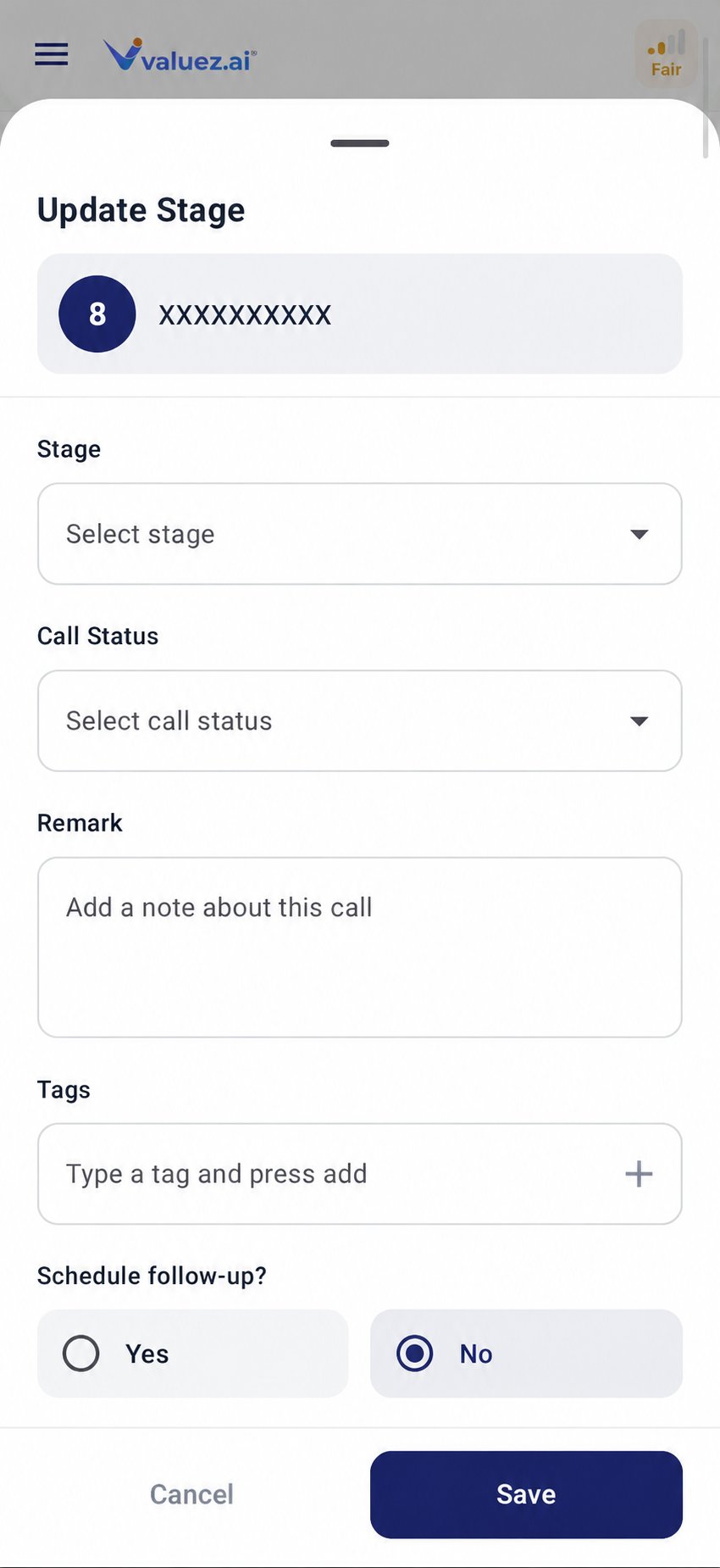 ## Update a customer stage
1. Open **Call Logs**.
2. Select the customer.
3. Tap **Update Stage**.
4. Choose the stage that best describes the current position.
5. Select the call status.
6. Add a concise remark and any useful tags.
7. Schedule a follow-up if you agreed on one.
8. Save the change.
## Choose the right stage
| Stage | Use it when | Example |
| - | - | - |
| **New** | The contact is newly assigned and has not been worked | New contact from your manager |
| **Contacted** | You reached the customer but have not confirmed interest | Customer answered and requested basic information |
| **Interested** | The customer wants to learn more | Customer asked for features or a brochure |
| **Qualified** | The need and buying opportunity are confirmed | Correct decision-maker with a relevant requirement |
| **Negotiation** | Price, quantity, or terms are being discussed | Customer requested a revised commercial offer |
| **Quotation** | You are preparing or sharing an offer for selected products | Products and quantities are ready for pricing |
| **Converted** | The agreed sales process is successfully completed | Customer accepted the offer or placed the order |
| **Not Interested** | The customer clearly declined | Customer asked not to continue the sales discussion |
| **Lost** | The opportunity is closed without a sale | Requirement cancelled or awarded elsewhere |
Your company may use the stages slightly differently. Follow the process given by your manager, and add a remark whenever the reason is not obvious.
## Call status and stage are different
**Call status** describes one call. **Stage** describes the overall customer relationship.
Examples:
* A call can be **Busy** while the customer remains **Interested**.
* A call can be **Connected** while the customer moves from **Qualified** to **Negotiation**.
* A **Wrong Number** status may require corrected CRM data or closure based on company policy.
Do not move a customer backward or close an opportunity based only on a missed call.
## Prepare a quotation
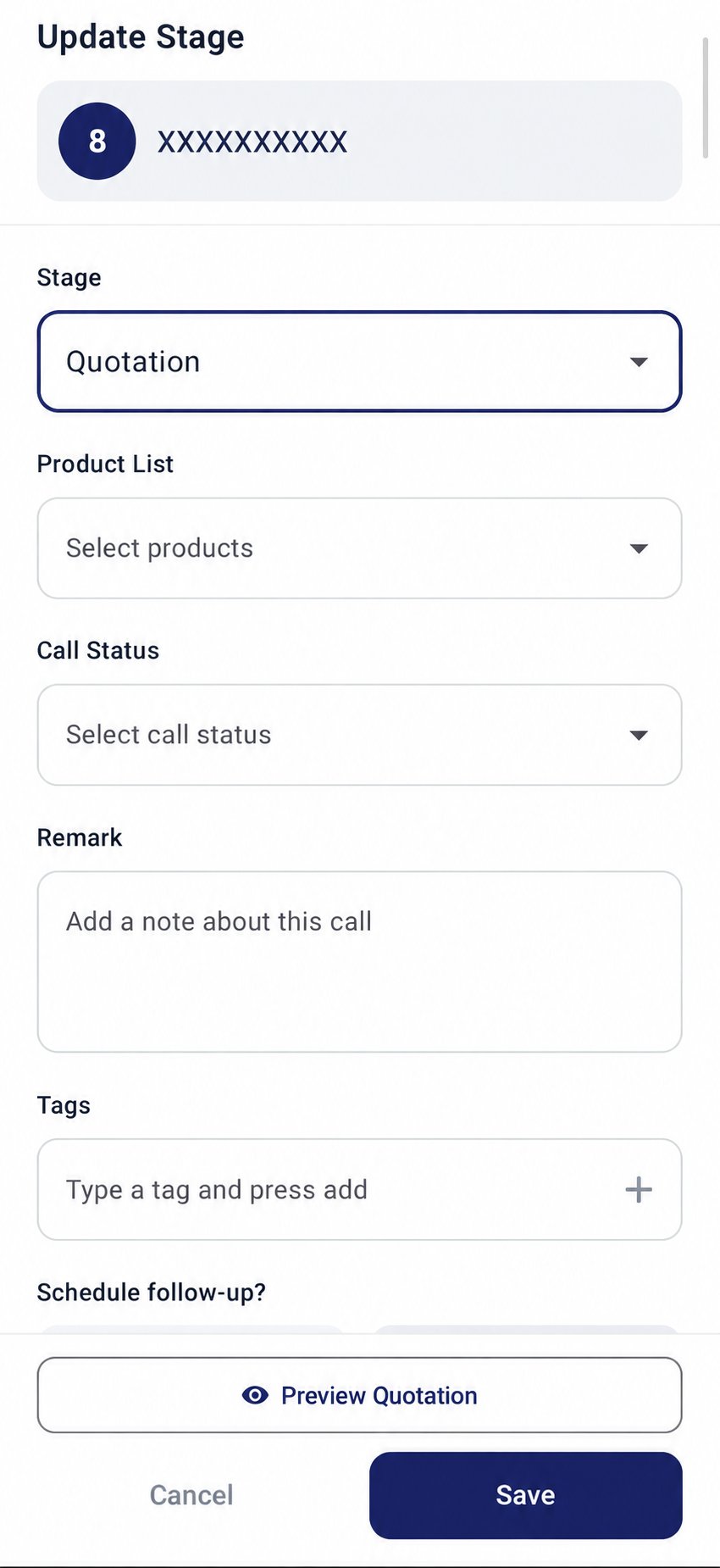
When you select **Quotation**, product controls become available.
1. Select **Quotation** as the stage.
2. Open **Product List**.
3. Select the products discussed with the customer.
4. Complete the available quantity, price, or product information required by your workspace.
5. Choose the correct call status.
6. Add a remark that records the customer’s request and any agreed deadline.
7. Tap **Preview Quotation** and review the details.
8. Correct any mistake before saving or continuing.
## Update a customer stage
1. Open **Call Logs**.
2. Select the customer.
3. Tap **Update Stage**.
4. Choose the stage that best describes the current position.
5. Select the call status.
6. Add a concise remark and any useful tags.
7. Schedule a follow-up if you agreed on one.
8. Save the change.
## Choose the right stage
| Stage | Use it when | Example |
| - | - | - |
| **New** | The contact is newly assigned and has not been worked | New contact from your manager |
| **Contacted** | You reached the customer but have not confirmed interest | Customer answered and requested basic information |
| **Interested** | The customer wants to learn more | Customer asked for features or a brochure |
| **Qualified** | The need and buying opportunity are confirmed | Correct decision-maker with a relevant requirement |
| **Negotiation** | Price, quantity, or terms are being discussed | Customer requested a revised commercial offer |
| **Quotation** | You are preparing or sharing an offer for selected products | Products and quantities are ready for pricing |
| **Converted** | The agreed sales process is successfully completed | Customer accepted the offer or placed the order |
| **Not Interested** | The customer clearly declined | Customer asked not to continue the sales discussion |
| **Lost** | The opportunity is closed without a sale | Requirement cancelled or awarded elsewhere |
Your company may use the stages slightly differently. Follow the process given by your manager, and add a remark whenever the reason is not obvious.
## Call status and stage are different
**Call status** describes one call. **Stage** describes the overall customer relationship.
Examples:
* A call can be **Busy** while the customer remains **Interested**.
* A call can be **Connected** while the customer moves from **Qualified** to **Negotiation**.
* A **Wrong Number** status may require corrected CRM data or closure based on company policy.
Do not move a customer backward or close an opportunity based only on a missed call.
## Prepare a quotation
When you select **Quotation**, product controls become available.
1. Select **Quotation** as the stage.
2. Open **Product List**.
3. Select the products discussed with the customer.
4. Complete the available quantity, price, or product information required by your workspace.
5. Choose the correct call status.
6. Add a remark that records the customer’s request and any agreed deadline.
7. Tap **Preview Quotation** and review the details.
8. Correct any mistake before saving or continuing.
 Always verify the customer name, selected products, quantities, prices, taxes, and contact details before sharing a quotation. The saved call summary is a reference; your reviewed quotation is the business record.
## Write useful remarks
A good remark records the decision and next action:
* `Needs quotation for 10 units; send by 4 PM today.`
* `Price discussion in progress; manager approval needed for discount.`
* `Quotation shared; follow up Monday at 10:30 AM.`
Avoid vague remarks such as `done`, `talked`, or `call again`.
## Before marking Converted or Lost
For **Converted**, confirm the success condition used by your company, such as an accepted quotation or completed order. For **Lost**, record the reason so the team can understand what happened.
Review network, SIM, battery, permissions, and call-recording status.
This documentation is built and hosted on [Mintlify](https://mintlify.com), a developer documentation platform.
Always verify the customer name, selected products, quantities, prices, taxes, and contact details before sharing a quotation. The saved call summary is a reference; your reviewed quotation is the business record.
## Write useful remarks
A good remark records the decision and next action:
* `Needs quotation for 10 units; send by 4 PM today.`
* `Price discussion in progress; manager approval needed for discount.`
* `Quotation shared; follow up Monday at 10:30 AM.`
Avoid vague remarks such as `done`, `talked`, or `call again`.
## Before marking Converted or Lost
For **Converted**, confirm the success condition used by your company, such as an accepted quotation or completed order. For **Lost**, record the reason so the team can understand what happened.
Review network, SIM, battery, permissions, and call-recording status.
This documentation is built and hosted on [Mintlify](https://mintlify.com), a developer documentation platform.