
values as a pronunciation to test. Adjust the spelling until the selected voice sounds right.
Before you begin
Open AI Voice Agents, select your agent, and choose Word Normalization. You need permission to update its knowledge base to save rules. Start with a word you have already heard mispronounced in a test conversation. A few focused corrections are easier to maintain than a large list of unnecessary replacements.Add a pronunciation rule
- Select Add word.
- In Word or phrase to match, enter the term exactly as it appears in your content.
- Choose Pronunciation only.
- Enter the desired sound in Spoken pronunciation form.
- Select English, Hindi, Marathi, or All languages.
- Select Preview to listen as an initial check.
- Select Save word.
- Reopen the rule to confirm the saved spelling, pronunciation, and language.
- Open Test Agent and ask a question that makes the agent use that term.
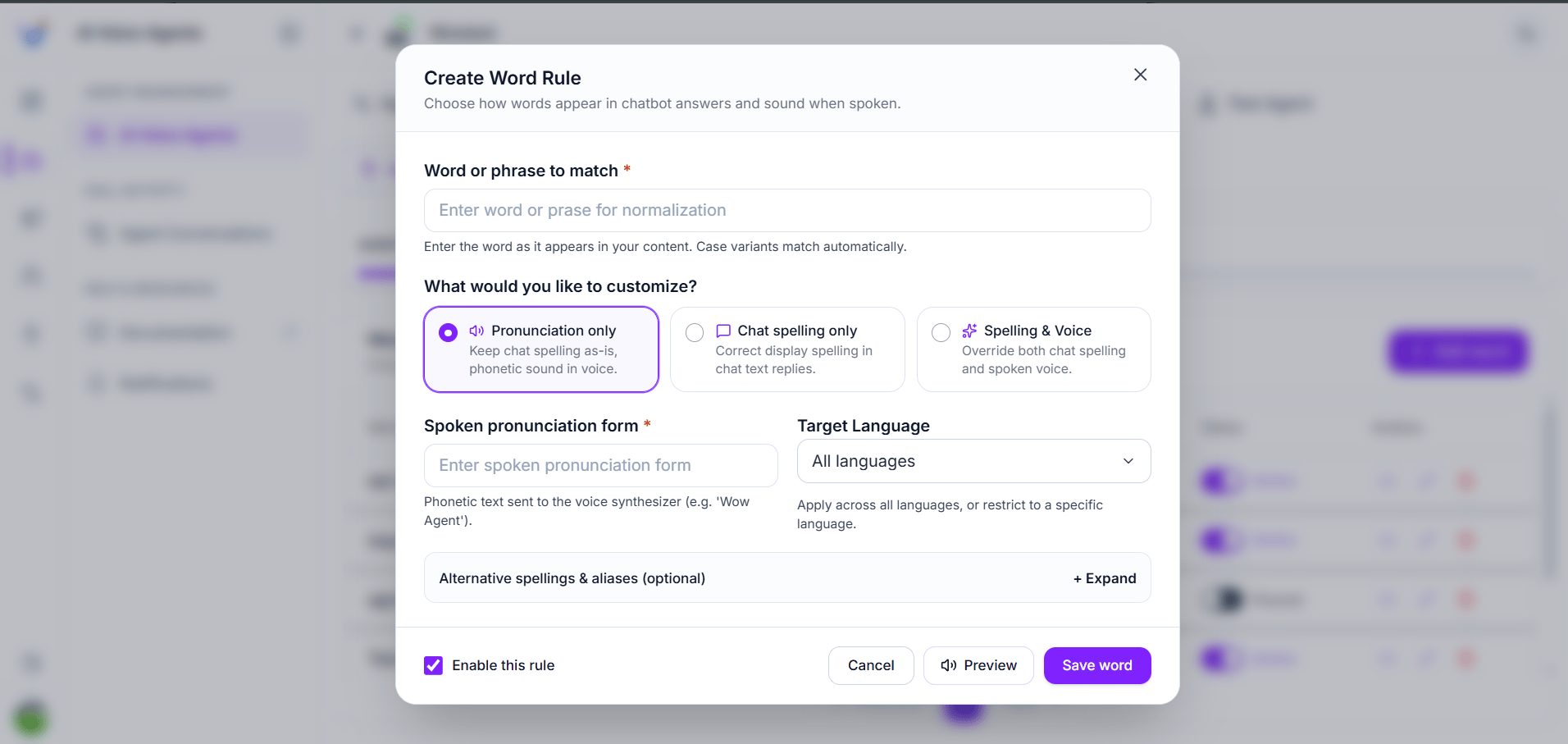
Create a word rule using Pronunciation only
This guide covers pronunciation rules. Other options visible in the dialog, including chat spelling and aliases, are not covered by this workflow. Use English, Hindi, Marathi, or All languages for the rules described here.
Understand the fields
Case variants match automatically for rules created through this form. Whole-word matching helps avoid replacing a short term inside an unrelated longer word.
Use a different spoken form from the original spelling. If the pronunciation is already correct, no rule is needed.
Choose an effective pronunciation
Write the sound in simple text. Try spaces between parts of a brand name, or between letters that should be spoken individually.
These are starting points for testing, not guaranteed pronunciations. Results depend on the selected voice and language. For Hindi and Marathi, try writing the spoken form in Devanagari.
Review and maintain rules
The rule list shows the matching word and its pronunciation. Use the edit action to change an existing rule, or delete a rule that is no longer needed. After changing a rule:- Reopen it to check the saved values.
- Start a fresh test conversation.
- Ask a question that naturally includes the term.
- Listen to the spoken response.
- Repeat the test in each language you use.
Troubleshooting
Test your agent
Check pronunciation in a complete conversation.
Manage business knowledge
Keep the facts and terminology used in answers up to date.